Does relisting edit the same listing?
No. Relisting creates a new listing. Use Edit when you want to retain the existing listing and change its details.
Relisting on Vinted creates a new listing from an existing item or a saved backup. VintHelper brings selection, photos, text and pricing into one Dressing+ workflow, so you can refresh several stale items without rebuilding each listing by hand. If you only need to change the existing listing, use Edit instead.
Review old stock before relisting it. A weak cover photo, an unclear size or an unrealistic price needs an improvement, not just a new publication date. Keep changes faithful to the garment you are selling.
Use Dressing+ search, filters and sorting to find the items. Select them, choose Republish in the action menu and execute it to open the preparation panel; opening this panel does not start the whole batch.
Select your listings in Dressing+, prepare their photos and details, and republish without rebuilding each listing by hand.
The left-hand list shows the selected garments; the settings apply across the batch. Arrange the order, review price changes and adjust individual prices when necessary. Choose whether to keep or reformulate wording according to the features available in your plan.
Review the image source and previews. A saved backup can supply original stored photos instead of repeatedly reusing platform-compressed versions. Edits should improve presentation, not alter the actual colour or hide a defect.
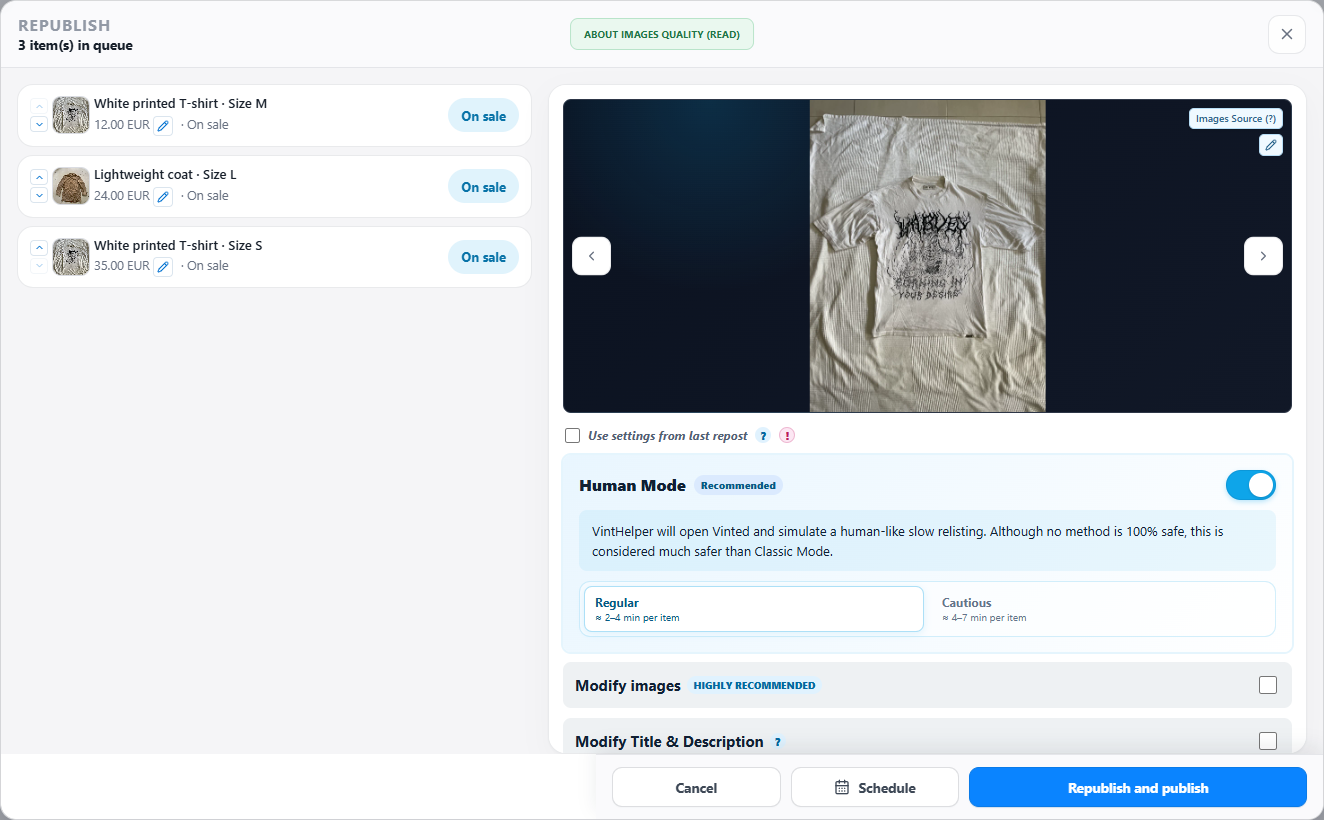
Select draft, publish now or scheduling where your plan supports it. Drafts let you review the prepared result before publication. Relisting a linked live item replaces it; do not treat this as a way to maintain two active copies of the same garment.
Human Mode works through Vinted's form. An item that needs a field checked can require manual review. Read the per-item result: a finished batch does not mean every item was published.
Keep Vinted and VintHelper open. A scheduled batch runs in your browser, not on an unattended cloud server; the device must be on and unlocked. The gap between items follows processing time rather than guaranteeing an exact publication time.
Cancelling stops the continuation; it does not undo completed relists. Check the current item before retrying. Use the illustrated guide for the full settings, then make Dressing+ your repeatable routine for the stock you choose to refresh.
No. Relisting creates a new listing. Use Edit when you want to retain the existing listing and change its details.
Yes. A saved backup can restore stored details and photos, including for an item that is no longer live. Review changes made after the backup.
Yes. Choose the draft option in the preparation panel and review the result before publishing.
No. It runs in your browser with the device on and unlocked and Vinted and VintHelper open.