Can buyers see my SKU and storage location?
These are private organisation fields in VintHelper; entering them does not change the public listing text.
A useful Vinted inventory system tells you which item you listed, where it is stored and what to pick when it sells. VintHelper gives you private SKU and location fields in Dressing+ and Backups, plus inventory views and exports. Build a simple stock routine before your wardrobe turns into a search through identical bags.
Use a unique SKU such as TOP-001 and a location such as Box A, shelf 2. A second black top gets its own reference even if the brand and size match. Put that reference on your physical storage label as well as in your record.
Keep purchase costs in your own cost record when calculating profit. A wardrobe valued at listing prices is potential revenue, not cash received or profit.
Find sold items by SKU, keep stock locations organised and manage your listings in Dressing+.
In Dressing+, enable SKU/INV in the table header. Enter the SKU and storage location in the item fields and save using the row control. Search by SKU when you need the garment again instead of relying on its public title.
These fields organise the article inside VintHelper; they do not add warehouse codes to your public Vinted title or description. The inventory control is also available in Backups.
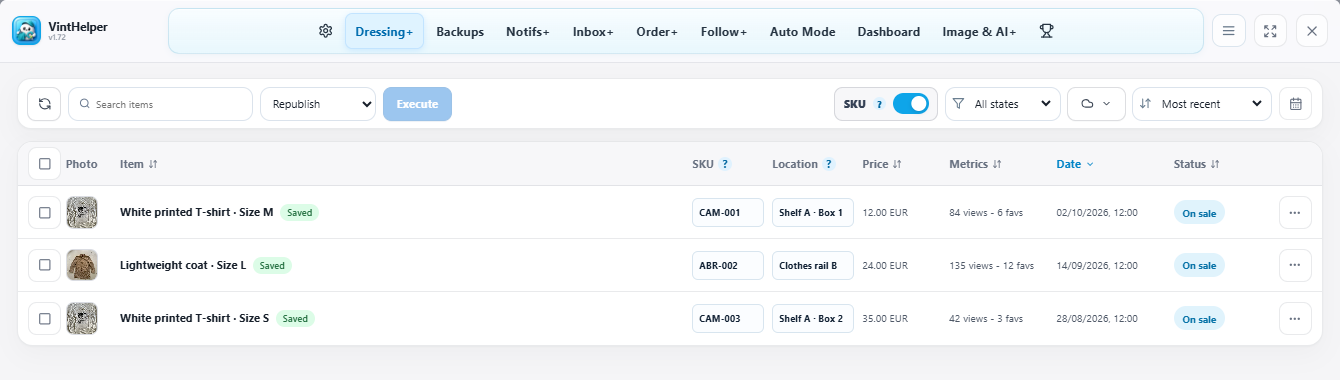
When preparing a sold order, use the available item reference and location to match the listing with the physical garment. Keep packing order and label order aligned. Correct the stored location when you move an item to another box.
A backup helps identify a saved article when you prepare a relist. With several wardrobes, combine the account filter with SKU search so similarly named stock does not get mixed together.
Dashboard shows inventory status, value at asking prices and listing age. Use those views to decide which articles need a new photo, a price review or a relist, instead of reducing every price equally.
Export the columns you need when you want a working file outside VintHelper. Install the extension, organise a small group of items and make the same reference system part of every new listing.
These are private organisation fields in VintHelper; entering them does not change the public listing text.
Use SKU/INV in Dressing+ or Backups. The fields appear alongside the article's information.
No. Asking-price value is potential revenue. Profit requires actual selling prices and the costs you paid.
Yes. Export the relevant columns and keep the same SKU references in your external record.