Is negotiation the same as an automatic offer to favourites?
No. Negotiation responds to a buyer's proposed price; favourite offers are initiated after someone saves an item.
Vinted auto negotiation handles a buyer's offer according to the margin you choose: an acceptable price can be accepted, while a lower proposal can receive your configured counteroffer. VintHelper separates these rules from AI replies to questions, so you can work your selling prices without typing every negotiation yourself.
For a €20 item, a maximum accepted discount of 15% gives a €17 threshold. An €18 offer falls within that margin; a €15 offer does not. Check the costs behind the item before setting a percentage for the wardrobe.
An accepted offer is not a completed sale. The buyer still needs to purchase. Use the rule to handle the conversation efficiently, not to count offers as revenue.
Set your acceptance threshold and counter-offer separately. Let VintHelper handle repetitive price negotiations within those rules.
A 10% counteroffer on the same €20 item proposes €18. That is a separate setting from accepting up to 15% off. A deliberate gap gives you a meaningful response when the buyer asks for more than you want to accept.
Configure negotiations in the AI Agent area of Auto Mode. Review the acceptance discount and counteroffer before enabling the process; configuring question replies is a different job.
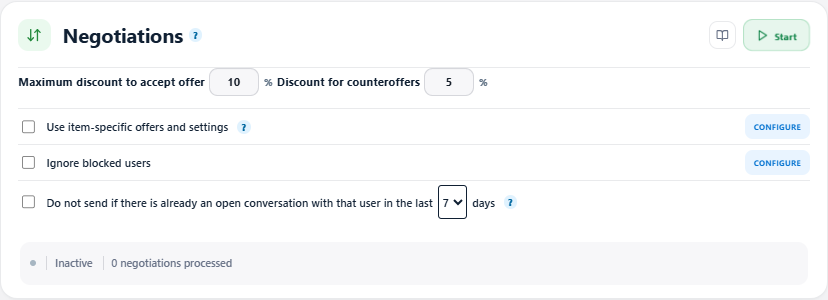
Enable saved article-specific settings when an item needs its own minimum or counteroffer. Review any items marked to be skipped rather than assuming the general discount applies everywhere.
Blocked-user and recent-conversation filters affect which offers are handled. If you skip existing conversations, another offer from the same buyer after your counteroffer can be skipped too. Pick that filter with the follow-up you want in mind.
Keep Vinted and VintHelper open on an active, unlocked device, start the negotiation controls and follow accepted, countered and skipped results in the history. Stop the tool when you want to take over yourself.
Install VintHelper and connect negotiation with the rest of your selling work: messages in Inbox+, notifications in Notifs+ and sold orders in Order+. The illustrated guide shows the current controls without turning every conversation into manual administration.
No. Negotiation responds to a buyer's proposed price; favourite offers are initiated after someone saves an item.
The first sets which buyer offers are acceptable; the second calculates the response price when you choose to counter.
Yes. Enable the article-specific settings and review the saved minimum or counteroffer for that article.
No. The buyer still has to complete the purchase.